
MEDICAL TOURISM CONSULTING
INSIGHTS · WEBSITE & PATIENT EXPERIENCE
Five website improvements that help international patients contact your clinic.
Practical ways to make your information clearer and connect it to a useful inquiry process.
Start with the questions behind an inquiry
An international visitor rarely arrives with the same context as a local patient. They may be comparing several countries, trying to understand a treatment name or checking whether your team can communicate in their language. A useful clinic website reduces that uncertainty without making promises it cannot support. These five improvements can help your team create a clearer path from research to contact. They are practical communication steps, not a guarantee of more patients.
1. Make service pages specific and understandable
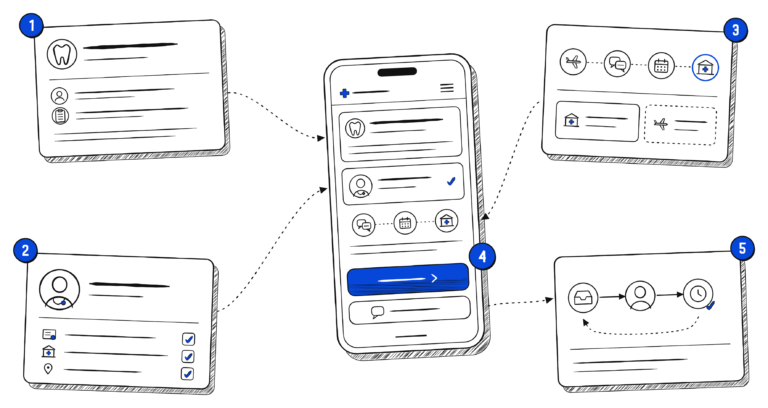
Give each priority service a clear explanation, including who provides it and what the next assessment step involves. Avoid a long list of treatment names with little supporting information. Explain unfamiliar terms in plain language, and make the page easy to scan with descriptive headings. Clinical statements should be reviewed by an appropriately qualified professional. If suitability depends on assessment, say so clearly rather than suggesting that a website description can determine an individual treatment plan.
2. Put credible provider information close to the decision
Visitors should not have to search several pages to understand who would be responsible for their care. Keep clinician profiles, relevant qualifications, facility information and contact details current. Explain what any certification or accreditation actually covers, and avoid badges whose meaning is unclear. Photographs and descriptions should represent the organisation accurately. Where you publish reviews, distinguish a person’s experience from evidence that another patient will have the same result. Credibility grows from information that can be checked.
3. Explain the practical international patient journey
A person researching care abroad may need to understand language support, the inquiry process, appointment coordination and the difference between clinical fees and travel arrangements. Describe the steps your organisation actually supports. Explain which details are agreed after assessment and which services are handled by another provider. A short sequence—from initial contact to the next confirmed step—can be more useful than a broad promise of a seamless experience. Keep the boundaries of your role visible.
4. Make contact simple on a phone
Review your priority pages on a small screen. Check that text is readable, buttons have clear labels and important information is not hidden behind intrusive overlays. Use a contact route that your team actively monitors. Explain what a person should send initially and what happens after submission. Ask only for the information needed at that stage, and provide the appropriate privacy information. A general website form should not casually invite medical records when a more suitable secure process is needed.
5. Connect the website to a real response workflow
A clear page is only part of the experience. Agree who receives inquiries, how they are assigned and when a clinical or coordination specialist should take over. Give staff enough context to recognise the service or page that prompted the inquiry. Set an internal response objective your team can support, and review missed or incomplete handoffs. Useful measures may include response time, the share of inquiries that can be routed correctly and recurring questions that the website still fails to answer.
Choose one improvement and check what changes
Start with a priority service page and its contact route. Record the questions staff repeatedly answer, review the page against those questions and agree a small set of improvements. Check the mobile experience and confirm who owns each content update. After implementation, review inquiry quality and staff feedback rather than treating page views alone as success. If the main obstacles are still unclear, a scoped International Patient Readiness Review can bring website, search and workflow observations into one prioritised plan.
Keep the improvements maintainable
Choose an owner for each page and record when important information was last checked. A service page can become misleading when staff, facilities or support arrangements change, even if its design still looks polished. Keep a short update checklist that covers contact details, language availability, clinician information and links. Ask the people handling inquiries which explanations visitors misunderstand. That feedback creates a useful routine for improving content, and helps your website remain connected to the actual work of your team.
Find the priorities on your website.
A focused review can help connect website improvements with search visibility and your inquiry process.
Altay
Medical Tourism Consulting
Strategy, digital presence and patient operations for international healthcare businesses.
Altay Consulting Ltd.
Baglarbasi, Sakarya Sok. No:31/1 Istanbul, Turkey
Baglarbasi, Sakarya Sok. No:31/1 Istanbul, Turkey
© 2026 Altay Medical Tourism Consulting.